组件
组件的概念
组件本身是一个对象(仅考虑对象的情况,忽略函数式组件)。它必须包含一个 render 函数,该函数决定了它的渲染内容。
如果我们想要定义数据,那么需要通过 data 选项进行注册。data 选项应该是一个 函数,并且 renturn 一个对象,对象中包含了所有的响应性数据。
除此之外,我们还可以定义例如 生命周期、计算属性、watch 等对应内容。
const { reactive, h, render } = Vue

  const component1 = {
    setup() {
      const obj = reactive({
        name: '张三'
      })

      setTimeout(() => {
        obj.name = '李四'
      }, 2000);

      return () => h('div', obj.name)
    }
  }

   const component2 = {
    data() {
      return {
        msg: 'hello component'
      }
    },
    render() {
      return h('div', this.msg)
    },
    // 组件实例处理完所有与状态相关的选项之后
    created() {
      console.log('created', this.msg);
    },
    // 组件被挂载之后
    mounted() {
      console.log('mounted', this.msg);
    },
  }

  const vnode = h(component)
  // 挂载
  render(vnode, document.querySelector('#app'))
const { reactive, h, render } = Vue
const component1 = {
setup() {
const obj = reactive({
name: '张三'
})
setTimeout(() => {
obj.name = '李四'
}, 2000);
return () => h('div', obj.name)
}
}
const component2 = {
data() {
return {
msg: 'hello component'
}
},
render() {
return h('div', this.msg)
},
// 组件实例处理完所有与状态相关的选项之后
created() {
console.log('created', this.msg);
},
// 组件被挂载之后
mounted() {
console.log('mounted', this.msg);
},
}
const vnode = h(component)
// 挂载
render(vnode, document.querySelector('#app'))伪代码
对于 patch 函数,增加对组件的判断,组件的 type 是对象
function patch(n1, n2, container, anchor) {
    if (n1 && n1.type !== n2.type) {
        unmount(n1)
        n1 = null
    }

    const { type } = n2

    if (typeof type === 'string') {
        // 作为普通元素处理
    } else if (type === Text) {
        // 作为文本节点处理
    } else if (type === Fragment) {
        // 作为片段处理
    } else if (typeof type === 'object') {
        // vnode.type 的值是选项对象,作为组件来处理
        if (!n1) {
            // 挂载组件
            mountComponent(n2, container, anchor)
        } else {
            // 更新组件
            patchComponent(n1, n2, anchor)
        }
    }
}
function patch(n1, n2, container, anchor) {
if (n1 && n1.type !== n2.type) {
unmount(n1)
n1 = null
}
const { type } = n2
if (typeof type === 'string') {
// 作为普通元素处理
} else if (type === Text) {
// 作为文本节点处理
} else if (type === Fragment) {
// 作为片段处理
} else if (typeof type === 'object') {
// vnode.type 的值是选项对象,作为组件来处理
if (!n1) {
// 挂载组件
mountComponent(n2, container, anchor)
} else {
// 更新组件
patchComponent(n1, n2, anchor)
}
}
}function mountComponent(vnode, container, anchor) {
// 通过 vnode 获取组件的选项对象,即 vnode.type
const componentOptions = vnode.type
// 获取组件的渲染函数 render,data和生命周期函数
const {
render,
data,
beforeCreate,
created,
beforeMount,
mounted,
beforeUpdate,
updated
} = componentOptions
// 在这里调用 beforeCreate 钩子
beforeCreate && beforeCreate()
// 调用 data 函数得到原始数据,并调用 reactive 函数将其包装为响应式数据
const state = reactive(data())
// 定义组件实例,一个组件实例本质上就是一个对象,它包含与组件有关的状态信
息
const instance = {
// 组件自身的状态数据,即 data
state,
// 一个布尔值,用来表示组件是否已经被挂载,初始值为 false
isMounted: false,
// 组件所渲染的内容,即子树(subTree)
subTree: null
}
// 将组件实例设置到 vnode 上,用于后续更新
vnode.component = instance
// 在这里调用 created 钩子
created && created.call(state)
effect(
() => {
// 调用组件的渲染函数,获得子树
const subTree = render.call(state, state)
// 检查组件是否已经被挂载
if (!instance.isMounted) {
// 在这里调用 beforeMount 钩子
beforeMount && beforeMount.call(state)
// 初次挂载,调用 patch 函数第一个参数传递 null
patch(null, subTree, container, anchor)
// 重点:将组件实例的 isMounted 设置为 true,这样当更新发生时就不再次进行挂载操作,而是会执行更新
instance.isMounted = true
// 在这里调用 mounted 钩子
mounted && mounted.call(state)
} else {
// 在这里调用 beforeUpdate 钩子
beforeUpdate && beforeUpdate.call(state)
// 当 isMounted 为 true 时,说明组件已经被挂载,只需要完成自更新即可
// 所以在调用 patch 函数时,第一个参数为组件上一次渲染的子树,
// 意思是,使用新的子树与上一次渲染的子树进行打补丁操作
patch(instance.subTree, subTree, container, anchor)
// 在这里调用 updated 钩子
updated && updated.call(state)
}
// 更新组件实例的子树
instance.subTree = subTree
},
{ scheduler: queueJob }
)
}function mountComponent(vnode, container, anchor) {
// 通过 vnode 获取组件的选项对象,即 vnode.type
const componentOptions = vnode.type
// 获取组件的渲染函数 render,data和生命周期函数
const {
render,
data,
beforeCreate,
created,
beforeMount,
mounted,
beforeUpdate,
updated
} = componentOptions
// 在这里调用 beforeCreate 钩子
beforeCreate && beforeCreate()
// 调用 data 函数得到原始数据,并调用 reactive 函数将其包装为响应式数据
const state = reactive(data())
// 定义组件实例,一个组件实例本质上就是一个对象,它包含与组件有关的状态信
息
const instance = {
// 组件自身的状态数据,即 data
state,
// 一个布尔值,用来表示组件是否已经被挂载,初始值为 false
isMounted: false,
// 组件所渲染的内容,即子树(subTree)
subTree: null
}
// 将组件实例设置到 vnode 上,用于后续更新
vnode.component = instance
// 在这里调用 created 钩子
created && created.call(state)
effect(
() => {
// 调用组件的渲染函数,获得子树
const subTree = render.call(state, state)
// 检查组件是否已经被挂载
if (!instance.isMounted) {
// 在这里调用 beforeMount 钩子
beforeMount && beforeMount.call(state)
// 初次挂载,调用 patch 函数第一个参数传递 null
patch(null, subTree, container, anchor)
// 重点:将组件实例的 isMounted 设置为 true,这样当更新发生时就不再次进行挂载操作,而是会执行更新
instance.isMounted = true
// 在这里调用 mounted 钩子
mounted && mounted.call(state)
} else {
// 在这里调用 beforeUpdate 钩子
beforeUpdate && beforeUpdate.call(state)
// 当 isMounted 为 true 时,说明组件已经被挂载,只需要完成自更新即可
// 所以在调用 patch 函数时,第一个参数为组件上一次渲染的子树,
// 意思是,使用新的子树与上一次渲染的子树进行打补丁操作
patch(instance.subTree, subTree, container, anchor)
// 在这里调用 updated 钩子
updated && updated.call(state)
}
// 更新组件实例的子树
instance.subTree = subTree
},
{ scheduler: queueJob }
)
}生命周期
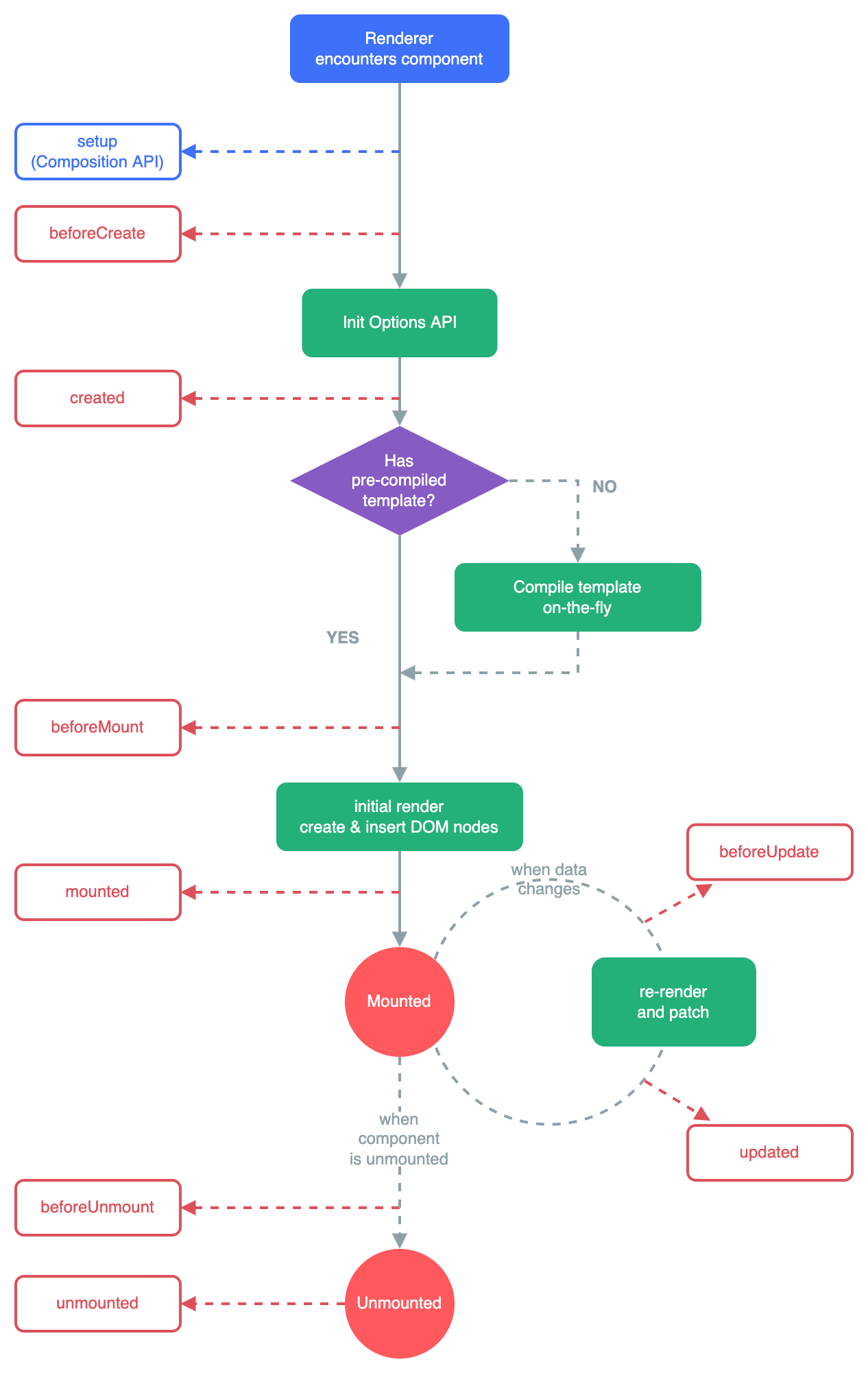
调度器
响应式数据中,effect 函数的第二个参数为调度器,当依赖触发时如果有调度器就执行调度器,在 mountComponent 传的调度器为一个微任务队列。
一旦组件自身的响应式数据发生变化,组件就会自动重新执行渲染函数,从而完成更新。但是,由于 effect 的执行是同步的,因此当响应式数据发生变化时,与之关联的副作用函数会同步执行。换句话说,如果多次修改响应式数据的值,将会导致渲染函数执行多次,这实际上是没有必要的。因此,我们需要设计一个机制,以使得无论对响应式数据进行多少次修改,副作用函数都只会重新执行一次。为此,我们需要实现一个调度器,当副作用函数需要重新执行时,我们不会立即执行它,而是将它缓冲到一个微任务队列中,等到执行栈清空后,再将它从微任务队列中取出并执行。有了缓存机制,我们就有机会对任务进行去重,从而避免多次执行副作用函数带来的性能销。
// 任务缓存队列,用一个 Set 数据结构来表示,这样就可以自动对任务进行去重
const queue = new Set()
// 一个标志,代表是否正在刷新任务队列
let isFlushing = false
// 创建一个立即 resolve 的 Promise 实例
const p = Promise.resolve()

// 调度器的主要函数,用来将一个任务添加到缓冲队列中,并开始刷新队列
function queueJob(job) {
    // 将 job 添加到任务队列 queue 中
    queue.add(job)
    // 如果还没有开始刷新队列,则刷新之
    if (!isFlushing) {
        // 将该标志设置为 true 以避免重复刷新
        isFlushing = true
        // 在微任务中刷新缓冲队列
        p.then(() => {
            try {
                // 执行任务队列中的任务
                queue.forEach(job => job())
            } finally {
                // 重置状态
                isFlushing = false
                queue.clear = 0
            }
        })
    }
}
// 任务缓存队列,用一个 Set 数据结构来表示,这样就可以自动对任务进行去重
const queue = new Set()
// 一个标志,代表是否正在刷新任务队列
let isFlushing = false
// 创建一个立即 resolve 的 Promise 实例
const p = Promise.resolve()
// 调度器的主要函数,用来将一个任务添加到缓冲队列中,并开始刷新队列
function queueJob(job) {
// 将 job 添加到任务队列 queue 中
queue.add(job)
// 如果还没有开始刷新队列,则刷新之
if (!isFlushing) {
// 将该标志设置为 true 以避免重复刷新
isFlushing = true
// 在微任务中刷新缓冲队列
p.then(() => {
try {
// 执行任务队列中的任务
queue.forEach(job => job())
} finally {
// 重置状态
isFlushing = false
queue.clear = 0
}
})
}
}setup 函数
组件的 setup 函数是 Vue.js 3 新增的组件选项,它有别于 Vue.js 2中存在的其他组件选项。这是因为 setup 函数主要用于配合组合式API,为用户提供一个地方,用于建立组合逻辑、创建响应式数据、创建通用函数、注册生命周期钩子等能力。在组件的整个生命周期中,setup 函数只会在被挂载时执行一次。
返回一个函数,函数返回值为vnode
const component = {
    setup() {
      const obj = reactive({
        name: '张三'
      })

      setTimeout(() => {
        obj.name = '李四'
      }, 2000);

      return () => h('div', obj.name)
    }
  }
const component = {
setup() {
const obj = reactive({
name: '张三'
})
setTimeout(() => {
obj.name = '李四'
}, 2000);
return () => h('div', obj.name)
}
}忽略组合式写法的 setup 的逻辑
function mountComponent(vnode, container, anchor) {
		...

    const {
      ...
        setup
    } = componentOptions


    // 定义组件实例,一个组件实例本质上就是一个对象,它包含与组件有关的状态信
    息
    const instance = {
        // 组件自身的状态数据,即 data
        state,
        // 一个布尔值,用来表示组件是否已经被挂载,初始值为 false
        isMounted: false,
        // 组件所渲染的内容,即子树(subTree)
        subTree: null
    }

    // 将组件实例设置到 vnode 上,用于后续更新
    vnode.component = instance

	 	// 没有create相关声明周期
  	// 组件的render为setup函数的返回值
    const render = setup();

    effect(
        () => {
            // 调用组件的渲染函数,获得子树
            const subTree = render.call(state, state)
            // 检查组件是否已经被挂载
            if (!instance.isMounted) {
                // 在这里调用 beforeMount 钩子
                beforeMount && beforeMount.call(state)

                // 初次挂载,调用 patch 函数第一个参数传递 null
                patch(null, subTree, container, anchor)
                // 重点:将组件实例的 isMounted 设置为 true,这样当更新发生时就不再次进行挂载操作,而是会执行更新
                instance.isMounted = true

                // 在这里调用 mounted 钩子
                mounted && mounted.call(state)
            } else {
                // 在这里调用 beforeUpdate 钩子
                beforeUpdate && beforeUpdate.call(state)

                // 当 isMounted 为 true 时,说明组件已经被挂载,只需要完成自更新即可
                // 所以在调用 patch 函数时,第一个参数为组件上一次渲染的子树,
                // 意思是,使用新的子树与上一次渲染的子树进行打补丁操作
                patch(instance.subTree, subTree, container, anchor)

                // 在这里调用 updated 钩子
                updated && updated.call(state)
            }
            // 更新组件实例的子树
            instance.subTree = subTree
        },
        { scheduler: queueJob }
    )
}
function mountComponent(vnode, container, anchor) {
...
const {
...
setup
} = componentOptions
// 定义组件实例,一个组件实例本质上就是一个对象,它包含与组件有关的状态信
息
const instance = {
// 组件自身的状态数据,即 data
state,
// 一个布尔值,用来表示组件是否已经被挂载,初始值为 false
isMounted: false,
// 组件所渲染的内容,即子树(subTree)
subTree: null
}
// 将组件实例设置到 vnode 上,用于后续更新
vnode.component = instance
// 没有create相关声明周期
// 组件的render为setup函数的返回值
const render = setup();
effect(
() => {
// 调用组件的渲染函数,获得子树
const subTree = render.call(state, state)
// 检查组件是否已经被挂载
if (!instance.isMounted) {
// 在这里调用 beforeMount 钩子
beforeMount && beforeMount.call(state)
// 初次挂载,调用 patch 函数第一个参数传递 null
patch(null, subTree, container, anchor)
// 重点:将组件实例的 isMounted 设置为 true,这样当更新发生时就不再次进行挂载操作,而是会执行更新
instance.isMounted = true
// 在这里调用 mounted 钩子
mounted && mounted.call(state)
} else {
// 在这里调用 beforeUpdate 钩子
beforeUpdate && beforeUpdate.call(state)
// 当 isMounted 为 true 时,说明组件已经被挂载,只需要完成自更新即可
// 所以在调用 patch 函数时,第一个参数为组件上一次渲染的子树,
// 意思是,使用新的子树与上一次渲染的子树进行打补丁操作
patch(instance.subTree, subTree, container, anchor)
// 在这里调用 updated 钩子
updated && updated.call(state)
}
// 更新组件实例的子树
instance.subTree = subTree
},
{ scheduler: queueJob }
)
}